Chat history and deleting local data
Published
ChatLite keeps your conversations in your own browser, not in a server-side archive. That makes a few things easy and a few things impossible, and this guide lists both.
What you will do
You will learn what is stored where, how to remove a conversation or all data from a browser, and what stays behind.
Before you start
In your browser
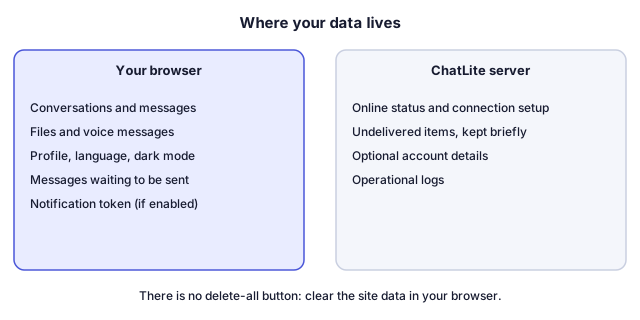
- IndexedDB (a database named ChatLiteDB) holds your conversations, messages with their attached files and voice messages, the contacts it has seen, messages waiting to be sent, and the account session when you are logged in to an account.
- localStorage holds your user ID, nickname, profile photo, status message, language choice, dark mode, unread counters and the notification token.
On the server
- Without an account: connection and online status, and a temporary in-memory queue for messages that could not be delivered (up to 50 per user, cleared when the server restarts).
- With an optional account: your e-mail address, a hashed password, your linked devices and session records, and undelivered items for linked devices for up to 14 days. Delivered items are removed from the queue.
- If you enable notifications: a push token registered with Google Firebase Cloud Messaging, and your language for those notifications.
- Operational logs, which may include nicknames and anonymous user IDs.
Steps
Remove one conversation from this browser
- Open the conversation, select More and then Leave Room.
- Confirm the question Leave current room? (Chat history will be deleted from this device).
- ChatLite deletes the conversation and its messages from this browser, tells the other members that you left and shows Left the room.
Remove everything from this browser
- ChatLite has no delete-all button. Open your browser's settings and clear the site data (cookies and stored site data) for chatlite.net.
- Reload ChatLite. It opens at the profile screen with no conversations.
The idea in a diagram
How to tell it worked
- After leaving a room, it is gone from the Conversations list and does not come back on reload.
- After clearing site data, you see the profile screen and No conversations yet once you start again.
If something goes wrong
I logged out but my chats are still there
Logout disconnects ChatLite, removes your push registration and ends an account session. It does not delete the history stored in the browser.
I left a room and the other person still has the conversation
Leaving removes the conversation from your browser only. Each person keeps their own copy.
I cleared the data and want my chats back
ChatLite does not keep a server-side copy of your history to restore from. Delivered items leave the server queue, and there is no export.
Another device still shows my chats
Each browser profile and device keeps its own data. Clear it there too. Devices linked to an account receive their own copies of new messages.
Everything vanished in a private window
Browsers discard site data from private windows when they close.
What ChatLite does not do
- There is no export and no delete-all function in the current version.
- ChatLite does not synchronize existing history between devices. An account lets linked devices receive new messages, as the queue allows.
- Deleting data in your browser does not delete what the other person stored.
- ChatLite does not currently offer an in-app way to delete an account.
Privacy and data
Relayed messages and files can technically be read by the server while they are being delivered, because ChatLite has no application-level end-to-end encryption. Direct browser-to-browser connections are encrypted between the browsers. The data handling page lists the server-side details in full.
Reviewed against ChatLite's current behavior on .